Problem:
After turning on the power switch, a prompt appears on the control screen: The crimp button is not activated. The machine's motor can be started. Press the open button several times and click 0K on the screen. The prompt still cannot be cleared.
After the machine is powered off and restarted, the fault message still exists and cannot be cleared, and the machine cannot work.
Unplug the controller, reinstall it, start the machine, and the fault message still appears. Still can't clear.
When the customer turned on the machine and started working, the failure prompt that the crimp button failed to start appeared again.
Pressing the open button and clicking OK cannot be eliminated.
If the machine is started for many times, the failure prompt that the crimp button fails to start always appears.
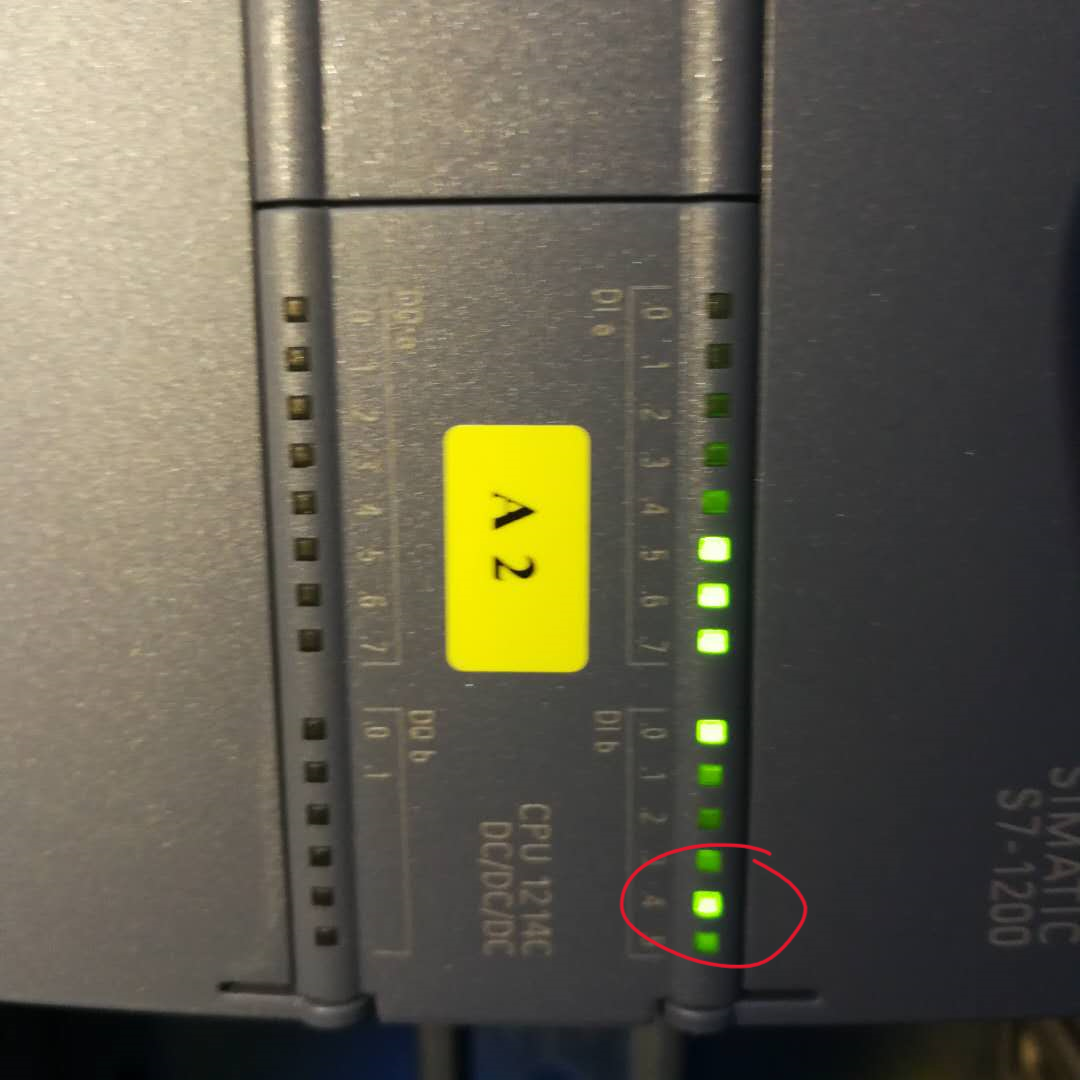
See the attached picture for the LED indicator of the CPU after power-on.
Solution:
Step to check:
please check which LEDS are ON on the CPU
Check connection wire and in the Controller
see attached picture you sent me the input 1.4 is on.
This means that the foot pedal or depth stop sends a signal to the CPU.
What has the customer connected to the machine ? Foot pedal or depth stop?
The customer should disconnect this from the machine.
If the error comes again?
Check the foot pedal or the depth stop something is wrong with.
Was this article helpful?
That’s Great!
Thank you for your feedback
Sorry! We couldn't be helpful
Thank you for your feedback
Feedback sent
We appreciate your effort and will try to fix the article