Solution:
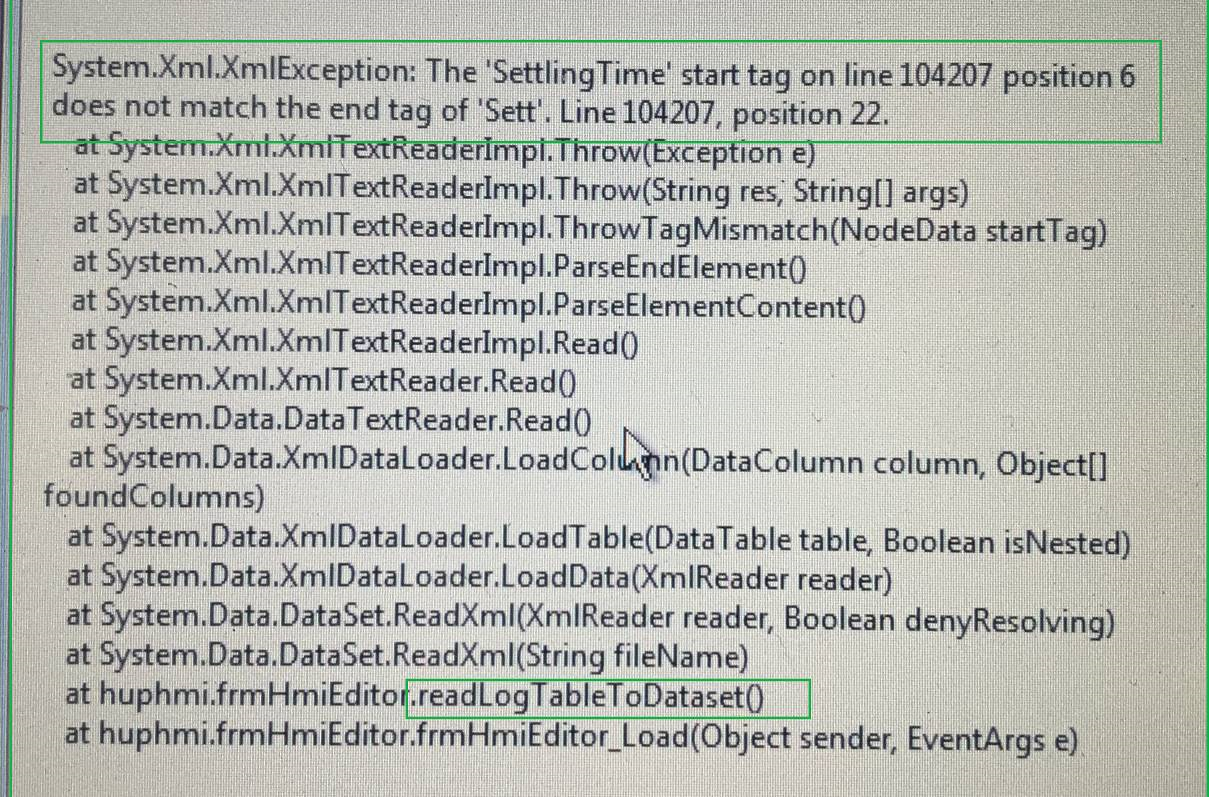
This is a standard Microsoft error message. You have to read it from bottom to top.
Reading the log table into a dataset(database) fails because in line 104207 position 6 there is a tag "<SettlingTime>" and in line 104207 and this tag must be ended in line 104207 in position 22 with "<\SettlingTime>".
Instead, line 104207 just says "Sett".
Or in plain text the log table has a damage in line 104207.
This can be fixed first by saving the file "Logtable.xml" somewhere else with the file manager and removing it from the log directory. Then the testbench creates a new log file.
The directory where the testbench stores the log file is visible in the settings.
The defective log file can be viewed and repaired e.g. with the free tool Notepad++.
Normally this happens when the IPC is de-energized while the file is being written. Writing 104207 lines takes already 4-5 seconds with Microsoft Cache.
Customers should also not leave 104207 checks stored on the test bench without backing up the data. With regular backups, the file remains smaller and the risk of destroying it is much lower since our power supply maintains power for about 2 seconds after the main switch is turned off.
Was this article helpful?
That’s Great!
Thank you for your feedback
Sorry! We couldn't be helpful
Thank you for your feedback
Feedback sent
We appreciate your effort and will try to fix the article